In many organizations, a huge amount of time is still spent on tasks that don’t really require human work. Especially nowadays, with the advent of generative AI and AI agents.
Every approval needed is followed up manually. Data is copied and moved from one system to another. Reminders depend on someone remembering to send them at the right time, following a tracking sheet that sometimes is confusing.
When you look at these tasks separeted they don’t seem like a big deal.
But most of these tasks happen every single day, across many different teams, turning it as routine; at the end, without noticing it, they quietly become a major drain on time, energy, and focus.
This is where business process automation starts to move from “nice to have” to something much more essential.
At a foundation, business process automation is about using technology to tackle repetitive tasks without manual intervention.
Instead of expecting people to:
Automation supports and provides systems to take care of those steps automatically and consistently, following the business rules set up in your ecosystem.
The goal isn’t to replace people’s jobs. Actually, what we are aiming for is to reduce the time spent on routine work so team members can apply their focus to what is actually important in this competitive environment, such as judgment, problem-solving, and creativity.
Currently, due to high market competition, there is an expectation that teams will perform faster and faster.
Work is more and more cross-functional. Deadlines are too short. And everyone expects that you are going to respond faster because they depend on your information.
At the same time, many of the internal processes in organizations and institutions haven’t evolved. They’re still using manual steps, many informal tracking, and individual effort. And if someone leaves the company, usually, they take all the information and “how-to” with them.
That confusion can cause many issues, such as:
Over time, these issues don’t just waste your team’s productivity and time. They really affect morale and overall productivity. Eventually, turning it into bigger issues such as absenteeism, turnover, and terminations.
On the other side, automation supports structure and teams’ confidence in the internal process. It supports workflows that are reliable, easily accessible, and less dependent on constant follow-ups.
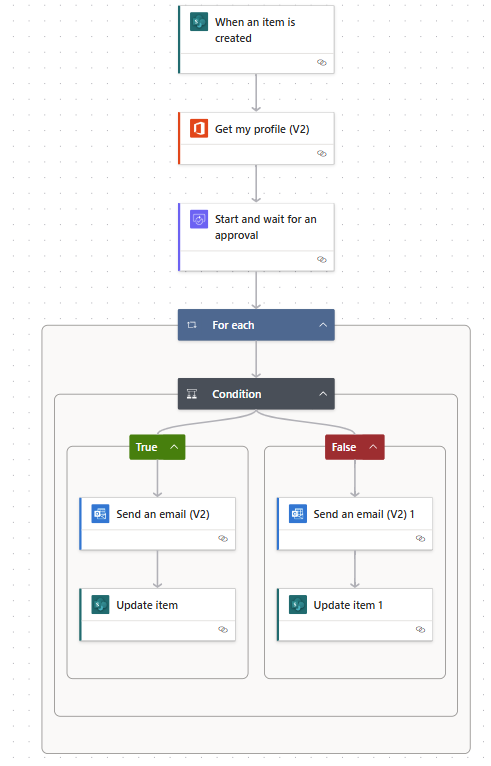
Most teams already have all the tools and opportunities for automation; they just don’t always figure it out them right away by themselves.
Here are a few points where automation can help to have an immediate impact:
Approval processes are generally speaking one of the biggest causes of delay.
Without automation, they usually count on emails, manual tracking, and usually having to follow up many times, and also reminders that may or may not be sent.
With automation, the approvals become much clearer:
Eventually, this steps reduces bottlenecks and makes the process easier to follow for everyone involved.
In many teams, assigning tasks still depends on someone, usually an overloaded manager or supervisor, manually reviewing requests and deciding who should take them.
Automation can simplify all of that.
Based on predefined business rules, such as category, priority, or team, tasks can be assigned automatically. This ensures that work is distributed consistently and that nothing goes wrong.
Nowadays, with the amount of information we are bombed every single day, to count on our memory is not a good idea.
So a good use for automation is that it can take control of notifications for example triggering them when specific business rules are met, such as:
This helps everyone to know what’s going on without adding extra energy.
Manual data entry is a huge time-consuming process and is where many errors happen.
With automation, forms can be filled in directly into structured systems like lists or databases. Information is collected once and stored in a consistent format, making it easier to track and report on later.
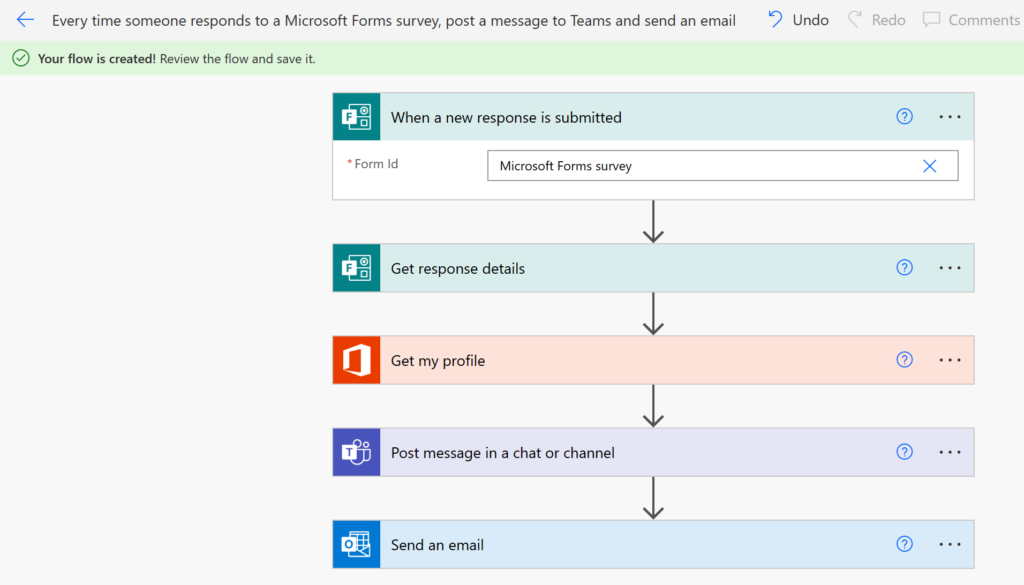
For organizations that have Microsoft 365 as their workspace system, the easiest tools that you can count on, and already part of your system for automation, is Power Automate.
It permits teams to create workflows with familiar tools like Microsoft Teams, SharePoint, Outlook, and Microsoft Lists.
With it, teams can:
Because it works within tools people are already using, adoption tends to be much smoother compared to introducing entirely new platforms.
One of the most frequest mistake we see in the market and under our consultations is that many companies are trying to automate everything right away as soon as they know the tools exists only following trends.
And actually, we can understand it. Once teams see the benefits, they want to apply it everywhere. And here is where it starts to become complicated. Because instead of making it easier, you start to making eveything difficut to maintain and even harder to use.
A more logical and doable approach is to start simple:
For example, instead of modifying and implementing automation an entire workflow, begin with:
With step by step approach, we can gain in scale compared to complex from the beginning
Automation works best when all rules are already well defined and clear.
If a process is not working properly, it is inconsistent or inefficient, automation won’t help to fix it. It will in the best case, simply make those issues happen faster and change nothing.
Before starting implementing automation, it’s important to:
In many cases, simplifying the process first makes automation much more easy to implement and will bring value to the end.
At HumanFlow Collaboration, we do not take automation as the only way to solve problems and provide solutions for your workspace.
It’s part of a broader approach focused on how work flows across teams.
This means:
The aim is not to create complex and difficult systems to work on. We want your teams to reduce rework, so team members can spend less time managing, tracking work and more time doing what matters to your organization.