Document Management Workflow That Actually Works

If you already suffered or struggled and spent more than a few minutes looking for a file, you probably can understand the problem.

Many small to medium businesses and organizations are driven by an individual structure approach than an institutionalized structure. Usually, documents are saved in different places or folders, with many versions existing at the same time, and you cannot count on naming conventions because they usually vary depending on who created the file. Over time, this creates a lot of confusion that decreases the performance and productivity everyday work.

This is not just a storage issue. It’s a workflow issue.

What is a document management workflow?

A document management workflow technically talks about how documents are:

  • Created (in a desktop version, online version, etc)
  • Stored ( The documents are stored in individual desktops, in personal or institutional cloud shared folders)
  • Shared (via which channel they are shared. The documents are shared via email, chats, posts, etc, for example)
  • Updated (updated in the desktop app and uploaded to a shared folder, or they are updated online in a folder shared in the cloud, but via OneDrive or SharePoint?)
  • Archived (Is there any retention policy in place, and how can you ensure they are applied)
 

When team members are unsure about this flow, and it is unclear or inconsistent, teams experience:

  • Duplicate documents
  • Version conflicts
  • Access issues
  • Time wasted searching
  • Bad decision-making

Why most document systems fail

Many organizations and institutions already have the right tools, for example, SharePoint or Google Drive.

The main issue is definitely not the technology or application itself.

Instead, the problems usually come from:

  • Lack of structure
  • No agreed naming conventions
  • Undefined ownership
  • Inconsistent use across teams

As a consequence, each person develops their own way of organizing files (again with an individual perspective), which leads to fragmentation and poor documentation workflow, that can hughly impact the health of your business in various aspects.

The impact on daily work

These issues are usually seen as small and insignificant, but they have a heavy impact in your business, regardless of the size, small to huge international corporations, and can be what is drowning your productivity and performance:

  • Meetings are delayed because documents cannot be found
  • Teams work on outdated versions
  • Important information is duplicated or lost
  • New team members struggle to navigate the system

Over time, this reduces efficiency, creates frustration, and leads team members to burnout as a side effect of the poor data management structure.

Key elements of a strong document workflow

A good approach for a document management workflow does not need to be complex, difficult and tedious. It needs to be clear and consistent.

  1. Clear structure – Folders or document libraries should be shown and structured in the way that teams actually work. Instead of using generic or individualized structures, it should be organized based on:
  • Projects
  • Functions
  • Teams
  • Operations
  1. Naming conventions – Simple naming rules can make a significant difference also because there are some pitfalls when you use cloud folders. Most cloud services have a limitation based on the structure when you want to share a document, and the name of the file or document plays a huge role in that in fact. For example, you could use the following name convention:
  • ProjectName_DocumentType_Date
  • Avoid vague names like “final_v2_updated”
  • Avoid personal notes in the name like “my-notes”, “for-review-Tuesday, etc.
  1. Version control – The main idea here is to establish first that we are going to work online and only with one live document. So this would be always a clear “source of truth.” Using tools like SharePoint allows:
  • Version history
  • Controlled editing
  • Reduced duplication
  1. Permissions and ownership – It is also really important to define and clarify roles and permissions for a specific folder or, if needed individual documents:
  • Who owns the document (that means which teams, department or project that the main folder pertains to)
  • Who can edit (all members in the project need to edit, all of them are going to work on the documetn? Which credentails they actually need for that specific folder?
  • Who can view (many of the times, some people who are not actually working on the document should have minimal access, mainly view or comments permission)

This will help assure and reduce accidental changes and confusion.

  1. Document lifecycle – Not all documents need to be active and live forever. The best approach is to work with retention timeframes, so you can make sure that when you open a document library (folder) for that specific team, program, initiative, project, etc, you will only find documents that are relevant for what you are currently working on. So it is important to define stages such as:
  • Active
  • Archived
  • Archived with restricted access

This keeps systems clean, manageable, and not overwhelming. What is more, most of the applications and platforms, such as SharePoint, allow you to set up these rules to automatically perform the retention business rule defined by your organization. 
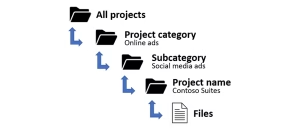
Structured document management workflow with folders and version control


Here you can see a practical example

Without a workflow:

  • Documents are saved locally, mainly in individuals’ desktops
  • Shared by email always creating the need to someone collect responses and put all the feedback together in a final version
  • Multiple versions exist. Meaning that you never know which document is the most updated and reliable document you have to work or count on.

With a workflow:

  • Documents are stored in a shared location, turning accessibility simple and clear
  • Access is controlled by the owners of the document library, making sure that only people who need access will have it
  • Updates happen in only one place, and you can be confident that you have only one version and can even track any changes or comments, and if needed, restore previous versions if someone changes something by mistake
  • Everyone works on the same version, so there is clarity on where and when the document is created, edited, and ready to be shared if it is the case

This simple shift alone can significantly improve efficiency and help in what in the end of the day counts to be profitable.
The role of tools like SharePoint

So, SharePoint is one of the tools that is already available under Microsoft 365 business subscription accounts. It is often used as a document management system because it supports:

  • Centralized storage on the cloud
  • Version control built-in
  • Permission management features that allow you to take control of who can access or not access your files. 
  • Integration with Teams and other Microsoft 365 ecosystem tools

However, as it was mentioned earlier, usually the tools are not the problem itself or even it does not solve the problem. Without a defined and clear workflow, even the best system becomes difficult to handle. It is also who or what we blame in the end, not the lack of organizations and a poor document management workflow.

Where HumanFlow Collaboration adds value

At HumanFlow Collaboration, the goal is to make document management practical and usable, increasing productivity, performance and profitability for small to medium-sized organizations.

This includes:

  • Designing structures aligned with real workflows that fit your needs
  • Reducing duplication, time consumption, and poor decision-making
  • Creating simple, clear guidelines that teams can follow easily, but stil aligned with your business vision

The focus is not on creating complex workflows, but on making everyday work easier for your team and business.

Final thoughts

A good document management workflow should be almost invisible and fluid within your organization.

When it works well:

  • People can find what they need faster
  • Teams collaborate more effectively
  • Less time is spent searching for and correcting errors or redoing the work

And more time is spent on what really matters for you and your business.